
The Vulnerability of Traditional Password Entry
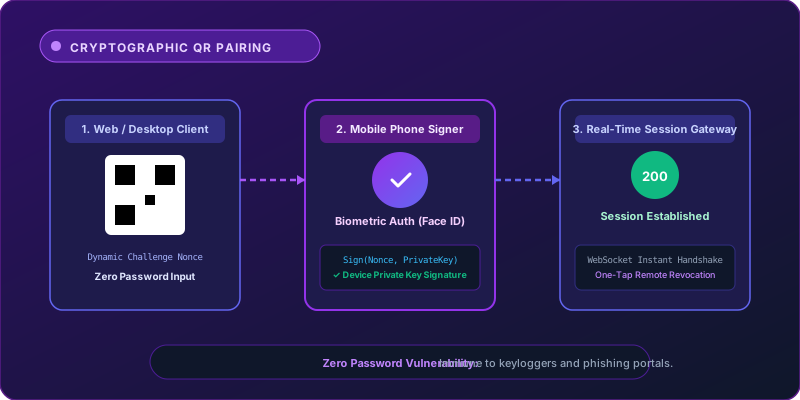
Typing passwords into public or shared computers exposes credentials to keyloggers, shoulder-surfing, browser credential stealers, and phishing portals. BondApex eliminates passwords during web and desktop login through dynamic, cryptographically signed QR pairing.
How QR-Code Device Pairing Operates
When you open the BondApex Web or Desktop client, the server generates a time-limited, cryptographically randomized challenge token displayed as a dynamic QR code. Using the authenticated BondApex Mobile app, you scan the code. Your phone signs the challenge token with its device private key and confirms the session with biometric authentication (Face ID or Fingerprint).
Real-Time Verification via Secure WebSockets
The signature is transmitted over an encrypted TLS channel to the authentication gateway. Once verified against your registered public key, the web browser receives an authorized session token in real time over a dedicated WebSocket connection. No password is ever typed or stored in browser memory.
Active Linked Devices & Remote Revocation
Users maintain total visibility over their active sessions. From the Mobile app’s Linked Devices settings, you can inspect all active Web and Desktop instances, including IP addresses, operating systems, and last-active timestamps. A single tap allows you to instantly revoke access to any device remotely.
Multi-Factor Protection with Biometric Vault Lock
In addition to QR pairing, BondApex features an optional Master Vault PIN and Biometric Lock. Sensitive credentials, tax documents, and private media stored in the Vault require separate local biometric authorization, ensuring multi-tiered defense even on shared workstations.